
Last updated on
Nov 6, 2026
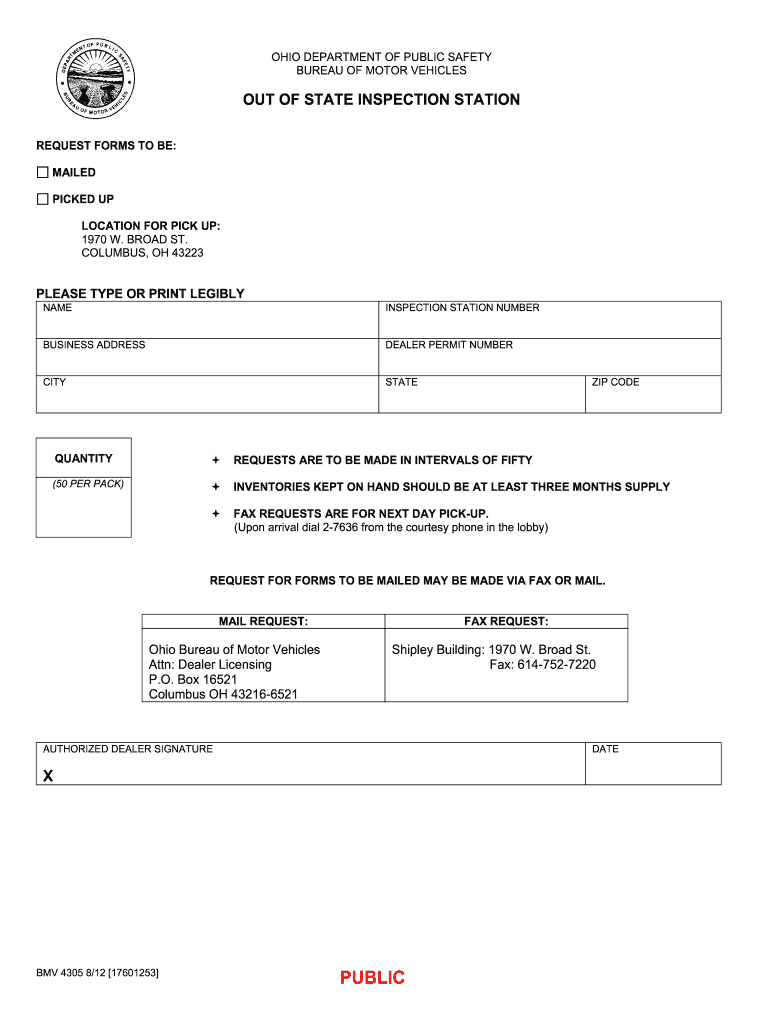
OH BMV 4305 2012-2026 free printable template
pdfFiller is not affiliated with any government organization

Fill out
Complete the form online in a simple drag-and-drop editor.

eSign
Add your legally binding signature or send the form for signing.

Share
Share the form via a link, letting anyone fill it out from any device.

Export
Download, print, email, or move the form to your cloud storage.
Why pdfFiller is the best tool for your documents and forms


End-to-end document management
From editing and signing to collaboration and tracking, pdfFiller has everything you need to get your documents done quickly and efficiently.
Accessible from anywhere
pdfFiller is fully cloud-based. This means you can edit, sign, and share documents from anywhere using your computer, smartphone, or tablet.
Secure and compliant
pdfFiller lets you securely manage documents following global laws like ESIGN, CCPA, and GDPR. It's also HIPAA and SOC 2 compliant.
What is OH BMV 4305
The Ohio Out of State Inspection Station Form is a government document used by authorized dealers to request inspection forms from the Ohio Bureau of Motor Vehicles.
pdfFiller scores top ratings on review platforms




I enjoy the ease of the app for all my business needs.
I used you to arrange a document and I…
I used you to arrange a document and I must point out that it was easy to operate and arrange. Very convenient to use and the customer service is pleasant and courteous.
Who needs OH BMV 4305?
Explore how professionals across industries use pdfFiller.

OH BMV 4305 is needed by:
-
Authorized vehicle dealers in Ohio
-
Out-of-state inspection stations
-
Motor vehicle businesses seeking compliance
-
Dealers applying for permits
-
Entrepreneurs in vehicle sales
Comprehensive Guide to OH BMV 4305
What is the Ohio Out of State Inspection Station Form?
The Ohio Out of State Inspection Station Form is a crucial document utilized by authorized dealers within Ohio. This form plays an essential role in facilitating the out-of-state inspections required for vehicles. It serves as a key tool for these dealers to comply with state regulations while ensuring that they request the necessary inspection forms efficiently.
Designed specifically for authorized dealers, the form requires critical information that aids in the inspection process. Its relevance cannot be overstated, as acquiring accurate data through this form streamlines communications with the Ohio Bureau of Motor Vehicles (BMV).
Purpose and Benefits of the Ohio Out of State Inspection Station Form
This form is indispensable for authorized dealers aiming to navigate the complexities of vehicle inspections. By using this form, dealers can enhance their compliance with state regulations, making the inspection process smoother and quicker. Additionally, the Ohio Out of State Inspection Station Form helps streamline communication, enabling dealers to request needed forms efficiently.
Utilizing this method saves time and reduces the potential for errors, ultimately fostering a more productive relationship between dealers and the Ohio BMV.
Key Features of the Ohio Out of State Inspection Station Form
-
Essential data fields include inspection station number, business address, and dealer permit number.
-
Options for submission methods are available, with checkboxes for 'Mailed' or 'Picked Up'.
-
Accurate dealership information is critical to avoid processing delays.
Overall, these features ensure that the form is comprehensive and allows authorized dealers to efficiently request essential inspection forms.
Who Needs the Ohio Out of State Inspection Station Form?
Only authorized dealers are eligible to utilize the Ohio Out of State Inspection Station Form. These dealers are responsible for ensuring compliance during vehicle inspections and must be specifically recognized to perform these tasks. Being authorized conveys a direct responsibility towards adherence to the state regulations governing vehicle inspections.
How to Fill Out the Ohio Out of State Inspection Station Form Online (Step-by-Step)
-
Access the form on the appropriate platform.
-
Enter your inspection station number accurately.
-
Provide your complete business address.
-
Input your dealer permit number.
-
Select the preferred method of submission, either 'Mailed' or 'Picked Up'.
-
Sign and date the form before submission.
These steps will guide you in completing the form accurately, helping to prevent common mistakes that could complicate the inspection request process.
Submission Methods and Delivery for the Ohio Out of State Inspection Station Form
Completed forms can be submitted through various methods to cater to different preferences and situations. Valid submission methods include:
-
Faxing the completed form directly to the designated office.
-
Mailing the form to the appropriate address.
-
Delivering the form in-person for immediate processing.
When using pdfFiller, you can easily manage these submissions, streamlining the overall process and ensuring that your forms are delivered accurately and on time.
Common Errors and How to Avoid Them
Users often encounter several frequent mistakes when completing the Ohio Out of State Inspection Station Form. Common pitfalls include:
-
Omitting required fields, such as their inspection station number or dealer permit number.
-
Incorrectly marking submission methods.
To enhance your submission's accuracy, always review the completed form thoroughly before sending it. This review helps mitigate errors that could delay your inspection request.
What Happens After You Submit the Ohio Out of State Inspection Station Form?
Once the form is submitted, several processes take place. The first step involves tracking your application status through the appropriate channels. Users can typically expect to receive notifications regarding the turnaround time for responses, which may vary based on workload.
There are several possible outcomes following submission, including:
-
Approval of the inspection request.
-
Requests for additional information, if necessary.
These outcomes are integral to ensuring that all documentation is properly reviewed and processed.
Security and Compliance for the Ohio Out of State Inspection Station Form
Handling the Ohio Out of State Inspection Station Form and associated documents with care is paramount. Using services like pdfFiller offers enhanced security features, such as 256-bit encryption, ensuring that sensitive information is protected throughout the process. Furthermore, the platform adheres to HIPAA and GDPR compliance, reinforcing users' privacy and data protection standards.
Empowering Your Experience with pdfFiller
Leveraging pdfFiller can significantly enhance your experience with managing forms. This cloud-based platform simplifies not only filling out the Ohio Out of State Inspection Station Form but also editing and eSigning other documents. The benefits of using pdfFiller include easy document management and seamless collaboration.
By utilizing pdfFiller, users can ensure a more efficient and secure way to handle their inspection forms, making the entire process straightforward.
How to fill out the OH BMV 4305
-
1.Access the Ohio Out of State Inspection Station Form by visiting pdfFiller and searching for the form by name.
-
2.Open the form in pdfFiller's editor, where you can easily navigate the document using the toolbar.
-
3.Before filling out the form, gather your inspection station number, business address, and dealer permit number to ensure you have all necessary information.
-
4.Fill out the 'NAME INSPECTION STATION NUMBER' field with the designated number assigned to your business.
-
5.Next, complete the 'BUSINESS ADDRESS' section with your business's physical location details.
-
6.Make sure to provide your dealer permit number in the specified field, ensuring accuracy to avoid processing delays.
-
7.Take a moment to review the checkboxes for selection, indicating whether you want the forms mailed or picked up.
-
8.Sign and date the form in the 'AUTHORIZED DEALER SIGNATURE' section, confirming you have provided correct information.
-
9.Once completed, thoroughly review the entire document for any potential errors or omissions before finalizing it.
-
10.Finally, save your completed form using the ‘Save’ option, or choose to download it directly for submission or storage.

Who is eligible to use the Ohio Out of State Inspection Station Form?
Only authorized dealers in Ohio can use the Ohio Out of State Inspection Station Form to request inspection forms from the Bureau of Motor Vehicles.
Where can I submit the completed form?
The completed form can be submitted either via mail as instructed or delivered in person to the Bureau of Motor Vehicles. Fax submissions are also available under specific instructions.
What information do I need to complete the form?
You need your inspection station number, business address, and dealer permit number to complete the Ohio Out of State Inspection Station Form accurately.
Are there any specific deadlines for submitting this form?
While the Ohio Out of State Inspection Station Form does not specify deadlines, it is advisable to submit it promptly to avoid any delays in receiving the requested inspection forms.
What are common mistakes to avoid when filling out the form?
Common mistakes include providing inaccurate information in required fields, failing to sign and date the form, or not selecting the preferred method of receiving forms. Always double-check your entries.
What is the processing time after I submit the form?
Processing times may vary, so it's best to check with the Ohio Bureau of Motor Vehicles for specific information regarding the timeline after submission.
Do I need to notarize the Ohio Out of State Inspection Station Form?
No, notarization is not required for the Ohio Out of State Inspection Station Form. Simply complete and sign the document as an authorized dealer.
Related Content
Related Forms


Related Catalogs
Get the latest insights from our blog


If you believe that this page should be taken down, please follow our DMCA take down process
here
.
This form may include fields for payment information. Data entered in these fields is not covered by PCI DSS compliance.